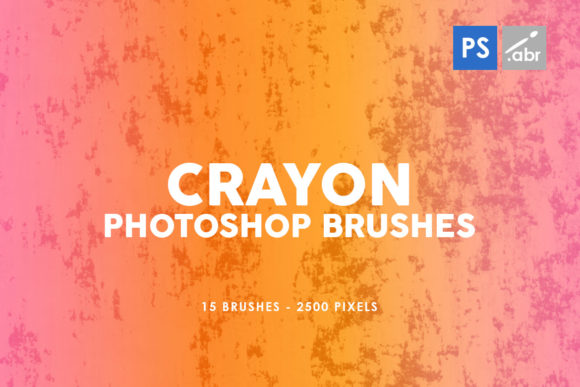
15 Crayon Texture Photoshop Stamp Brush
Adding a touch of childhood nostalgia to your digital projects can be as simple as using the right tool. The 15 Crayon Texture Photoshop Stamp Brush brings the authentic look and feel of crayon art into your design workflow. These brushes are crafted with high-resolution images, measuring up to 2500 pixels, making them ideal for detailed work without losing quality. Whether you're designing for print, web, or digital media, these textures offer endless creative possibilities.
What Makes Crayon Texture Brushes Unique?
The 15 Crayon Texture Photoshop Stamp Brush set is more than just a collection of images—it's a gateway to experimenting with texture and depth in your designs. Each brush captures the distinct qualities of crayon strokes: the grainy surface, the subtle color bleed, and the soft edges that make hand-drawn art so appealing. This level of detail makes the brushes perfect for creating authentic overlays, adding visual interest to otherwise flat images, or even simulating a hand-painted effect in digital artwork.
These brushes are compatible with all versions of Photoshop from CS2 to CC, ensuring that both seasoned professionals and newcomers can take advantage of their versatility. Their large size also allows for greater flexibility when scaling up or down, making them suitable for everything from small graphic elements to full-sized illustrations.
Creative Applications Across Industries
The 15 Crayon Texture Photoshop Stamp Brush is not limited to a single use case. Designers, artists, and marketers can apply these brushes in various ways depending on their needs. For instance, a marketer might use them to add a playful, whimsical touch to promotional materials targeting children or young adults. A game designer could incorporate these textures into background elements or character designs to give a handcrafted feel to the visuals.
Artists working on mixed-media pieces can layer these brushes over digital paintings to simulate traditional techniques. Educators might use them in classroom projects to teach students about texture and material simulation. Even small business owners looking to stand out in a crowded market can benefit by using these brushes to create unique branding elements or packaging designs that capture attention.
Designing with Purpose: Tips for Effective Use
To get the most out of the 15 Crayon Texture Photoshop Stamp Brush, consider how each texture interacts with your base image. Start by experimenting with opacity and blending modes to see how the crayon effect enhances or contrasts with your original content. Lowering the opacity can create a subtle, understated texture, while higher settings can produce bold, eye-catching results.
When using these brushes for photo overlays, think about the subject matter. A crayon texture might complement a vintage photograph or a retro-style illustration but may not be suitable for modern, clean-cut designs. Always ensure that the texture adds value rather than distracting from the main message of your project.
For those new to using stamp brushes, practice is key. Try applying the same texture to different types of images to understand how it behaves in various contexts. You might find that some textures work better for certain colors or lighting conditions than others. Keep notes on what works and what doesn’t—this will help you refine your approach over time.
Real-World Examples and Project Ideas
Imagine designing a poster for a children’s book launch. Using the 15 Crayon Texture Photoshop Stamp Brush, you could overlay the texture onto the background to give it a hand-drawn, artistic feel that matches the theme of the book. Similarly, if you're creating a logo for a brand that wants to convey creativity and playfulness, incorporating a subtle crayon texture could reinforce that identity in a visually appealing way.
Another idea is to use these brushes in digital scrapbooking or collage projects. Layering multiple textures can create a rich, layered look that mimics the tactile experience of working with physical materials. You can also use them in digital painting workflows to simulate the look of crayon sketches before refining them into polished illustrations.
For those interested in creating educational materials, these brushes can be used to design worksheets, flashcards, or interactive learning modules that encourage creativity and engagement. The tactile feel of crayon textures can make learning more enjoyable and memorable for students of all ages.
Ensuring Clarity and Consistency in Your Work
While the 15 Crayon Texture Photoshop Stamp Brush offers a lot of creative freedom, it’s important to maintain clarity and consistency in your final output. Avoid overusing the texture, as this can lead to a cluttered or unprofessional appearance. Instead, use it strategically to highlight specific areas or elements within your design.
Consistency is also key when working across multiple projects or platforms. If you're using these brushes for a series of designs, such as social media posts or website banners, make sure the texture is applied uniformly to maintain a cohesive visual style. This helps build brand recognition and ensures that your audience receives a consistent experience across all touchpoints.
Finally, don't be afraid to experiment and push the boundaries of what these brushes can do. Combining them with other textures, filters, or effects can lead to unexpected and exciting results. The goal is to use the 15 Crayon Texture Photoshop Stamp Brush as a tool to enhance your creative vision, not limit it.
Whether you're an experienced designer or just starting out, the 15 Crayon Texture Photoshop Stamp Brush provides a versatile and effective way to bring texture and character to your digital projects. With its high resolution and wide range of applications, it's a valuable addition to any creative toolkit. Explore the possibilities and let your imagination guide you toward new and innovative uses of this powerful resource.